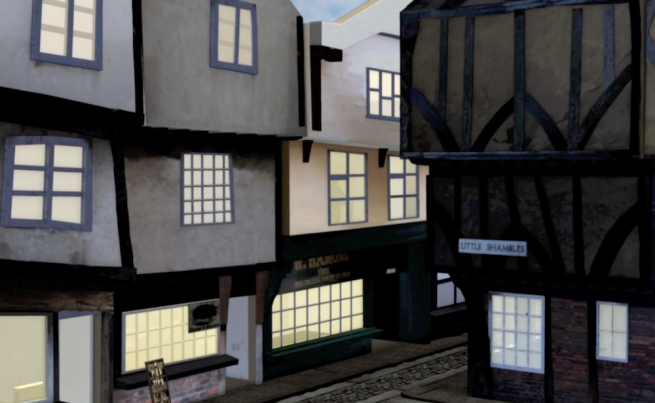
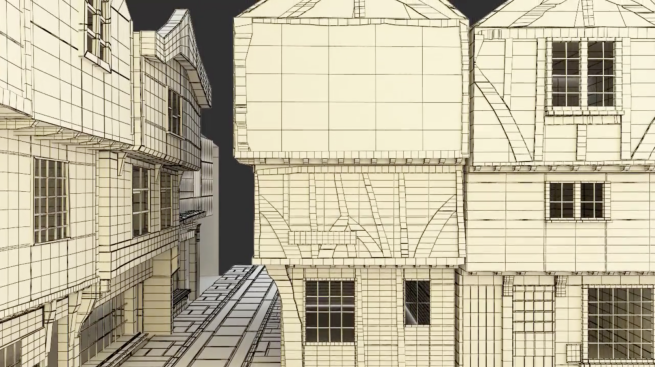
Having completed this project, I would like to discuss the lessons I’ve learnt and the changes I will implement in my workflow for future projects.
First of all, I will always do a quick command line render at low quality well before the actual render. This will quickly let me isolate and identify any problems with my scene and give me the opportunity to fix them before the production quality render.
I will use a render farm. This project was rendered entirely on my personal computer, and it took about a week for all the passes to finish rendering.
I started using MEL code later during my project but it still saved a lot of time. I set up MEL shortcuts for everything from assigning textures to planar projections. In the future whatever repetitive tasks I can automate, I will.
I will also re-use and recycle more, after identifying what can be safely re-used without compromising the strength of the piece. While I was modelling and texturing I should have given more thought to my previs. I thought that I should perfect everything, even if it was not to be used in my final render. This was a time-consuming mistake. I spent far too much time on the buildings, parts of which were not going to be seen. Although it is of course nice to be able to use different views in my portfolio now, I need to keep time constraints in mind and will revise my workflow to accommodate for this. I will immediately implement the camera previz into my model and perfect models from that stance.
Similarly for most of the textures, I created each one from scratch. In the future I will re-use textures if it is not a close-up shot, or at least start with the same texture and make a few edits in Photoshop.
I will avoid Render Proxies! I initially turned to render proxies because the cobbles in my scene made things unbearably slow. I did some research which seemed to indicate render proxies to be an ideal choice. Not so. I instantly lost full control of my texturing and could only fix it much later at the post-production stage in Nuke. I will instead be upgrading my graphics card in time for next year.
Lastly, my thoughts on render passes. I loved working with these. When I first started this project, the concept of render passes was alien to me. For that reason, I did not start setting them up until late in the game at the rendering stage. Although I did separate my models substantially, in the future I will set up render passes as soon as I start modelling. Moreover, I will be arranging them differently. Rather than rendering by building, for instance, I will be rendering passes according to the type of material, for example, glass, bricks, etc. I will also make much more extensive use of colour mattes (RGBA) for use in post-production as the few that I had (3*4) made life so much easier. I will also be dividing into more render passes because in case I need to re-render a model it would be so much easier.
From the beginning I had kept my scene organised into layers and especially when it came to render time, it paid off. It was really easy to then select the objects and assign them to different render layers in Maya. I separated the ground (sidewalk/pavement, cobbles, dirt) and the main objects of focus (the feather and the iconic Shambles building). I used contribution maps to make sure that each of these separated render layers still affected one another in terms of reflections. As well as adding the geometry I also added the lights to each of the render layers. My render setting presets were HD 720, Width: 1280, Height: 720 as per the brief. I used Mental Ray as the renderer.
The single frame rendering was looking just the way I wanted it, but my initial batch render was way too blown out. After checking if I had any stray lights wandering around, I figured I had to enable color management and set the default input profile to sRGB. This could be fixed after the fact in Nuke by changing the gamma but I wanted the best output to start with.
After this I added my chosen render passes for each of the layers with a different prefix and then associated the selected render passes with the current render layer.
Some of the passes I rendered out included:
ambient occlusion
diffuse
specular
beauty
reflection
incandescence
matte
opacity
scatter
shadow
translucence
I added all the render passes into a single exr file and then read the exr file into Nuke. Here I composited the various passes, added dirt, cracks and did a lot of colour correction using the hue shift, grade and colour correct nodes. I added all the secondary objects by rendering out separate passes and merging them in in post-production.
I’ve written some additional notes on Rendering in Maya in the linked post.
Once I was back on my feet, we filmed green screen footage with Mark B’s help.
I acquired my environment footage on a Canon DSLR at the Hinsdale train station. I took several photographs of the sky and noted the weather (not a cloud in the sky!) for lighting reference, which I then plan to use for light matching.
For the sound track I plan to use Audacity to mix several tracks and fix background noise.
This modelling project was great fun, combining my interests of history and travel with 3D. It gave me an excuse to repeatedly visit an incredibly picturesque street, the Shambles, again and again.
While I worked in SoftImage for my first year, I found Maya much more intuitive. The more I work in Maya the faster and more efficient I become. After a while I started optimizing my workflow to include shortcut keys and MEL code for my frequently used techniques. For example, I assigned shortcut keys to extrude faces, insert edge loops and duplicate faces. I also created a custom shelf for these same functions to be a click away at 4am when remembering fourteen dozen shortcut keys is a bit too much to ask.
I started using the Duplicate Faces technique midway through my project. For simplicity’s sake I was creating separate objects for different parts of the same storefront, e.g. the counter up front, the boulders on the sides, the windows, the signage areas… The duplicate face tool let me create a new, separate object of the same size and orientation, and I could slightly offset its position with ease.
The Create Polygon tool was also a personal favourite. I used this to create the planks on the top floors of the main Little Shambles building, as well as others. Since they were quite jagged this tool was very useful. Once I was finished, I extruded out the faces to give it some volume. Using this technique made it easy to create dozens of unique planks. I positioned them exactly the way they are in reality.
I used the Sculpt Geometry tool to create the cobbles. I wanted to embed their uneven nature into the geometry itself rather than using bump maps. I had to select the vertices first and then push and pull the points. After I got a texture on them, they started to get a little shaky and my scene began to crash. I had to save them out as render proxies and then duplicate those as an instance as detailed in my post about texturing and surfacing.
The offset edge loop tool was useful when it came to creating edge loops on two sides of an existing edge (in case I wanted to smooth the mesh).
My graphics card did pretty well when modelling with textures off, and since I did most of my models before texturing, it worked out fine. However for the finishing touches, for example when I was adding dirt on the sides of the walls, I had to make sure textures were off before I could achieve any semblance of progress.
My animation is mostly camera based and in first person in order to focus on what I’m most interested in, environment modelling. I started by bringing in my audio track, which I created by mixing 7 tracks and my own voice acting. In line with the audio track I then set the keyframes I wanted to hit at each point and then went back in to do the inbetweens. I also went into the curve editor to manually adjust the animation curves when necessary. All the while I kept the rule of thirds in mind while framing my shots.
The animation is about walking down the medieval street of Shambles in York, then hearing a sound — chickens clucking. The camera looks up to see where the noise is coming from, then left and right. The clucks turn into squawks and the footsteps audio change from a walk to a run. There is sudden silence. After turning the corner, the viewer spots a feather falling (in line with the brief – “Falling”). I created my own rig for the feather. The stalk can bend as can the feather hairs. Since feathers are so light there is not much squash but there is stretch. As the feather falls, we zoom in and when we’re really close drops of blood splatter everywhere.